Card Top-Up via External Wallet
Fund your CrossFi Card by transferring XFI from an external wallet into your Card Balance (Held Balance) using Home → Add Money → Transfer from external wallet.
This page covers the Transfer from external wallet option inside Home → Add Money.
If you want to fund your card using the built-in wallet (Wallet tab) or the Internal transfer option (I have crypto (XFI or USDC)), see:
In-App Web3 Wallet💳 Instant Availability
Topped-up funds are immediately available for CrossFi Card transactions and in-app purchases.
🔒 Full Control
Your funds remain under your control - withdraw (unhold) them back to your wallet at any time.
🌐 Multi-Wallet Support
Compatible with MetaMask, OKX Wallet, SafePal, imToken, Gems, and other Web3 wallets.
Prerequisites
Before you begin the top-up process, ensure you have:
- EVM-compatible wallet (MetaMask recommended)
- XFI tokens on CrossFi network for the top-up amount
- Additional XFI for gas fees - ensure you have extra XFI beyond your top-up amount to cover transaction fees
If you don't have XFI tokens yet, check out our comprehensive guide on How to get XFI You can also use the built-in Swap feature in CrossFi App to exchange tokens from other networks directly within the app. CrossFi App Swap Guide
Supported Wallets
CrossFi App supports multiple Web3 wallets including:
- MetaMask (recommended)
- OKX Wallet
- SafePal
- imToken
- Gems
All wallets support the same top-up functionality and security features. We recommend MetaMask for optimal experience due to its excellent security features and easy CrossFi network configuration.
XFI Console Migration
If you have XFI tokens in XFI Console, you can import your seed phrase into MetaMask to access your tokens.
Learn more: Complete XFI Console to CrossFi App Migration Guide
Step-by-Step Top-Up Guide
📱 Interactive Demo: How to Top-Up CrossFi App Balance
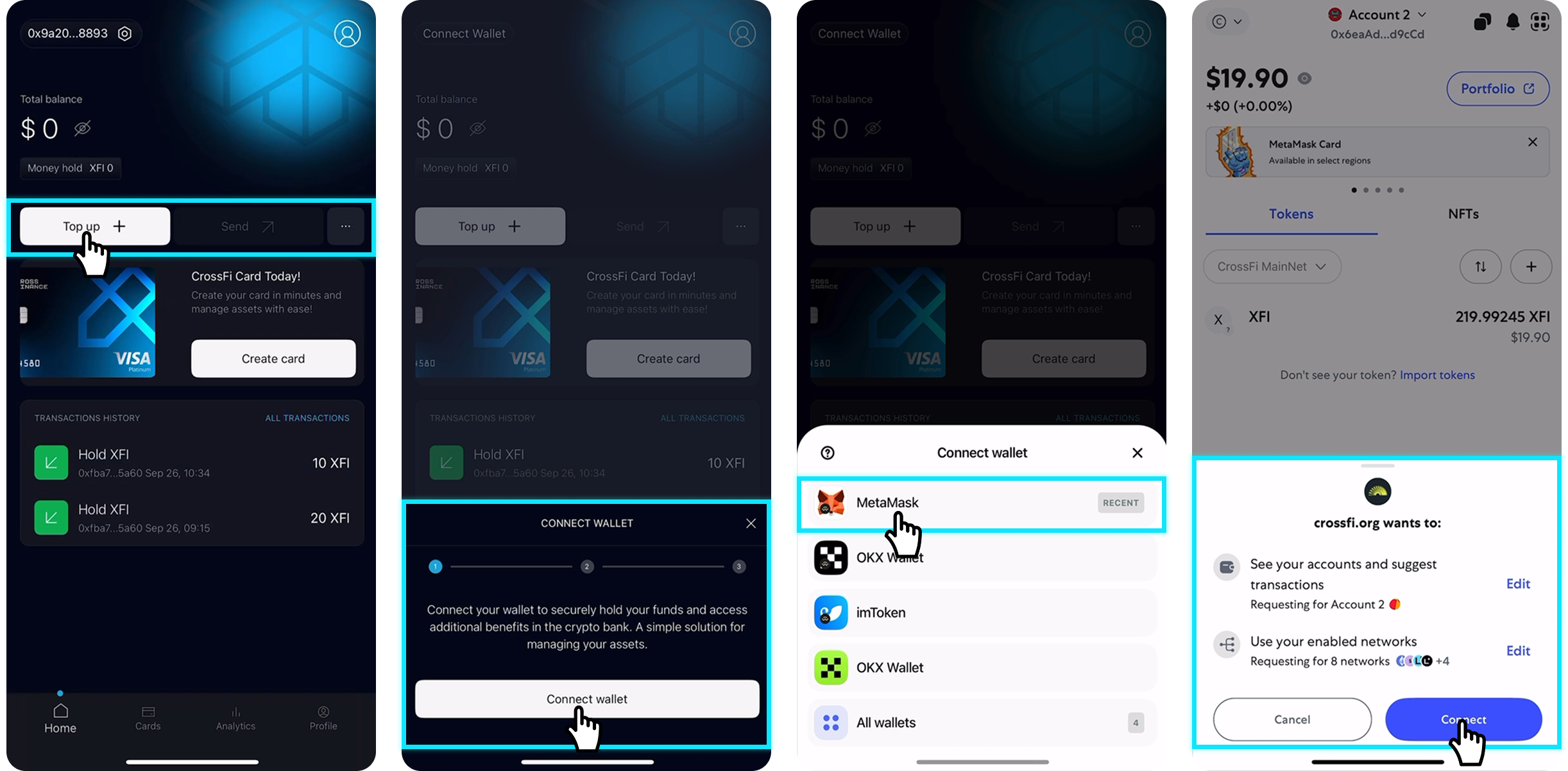
Step 1: Connect Your Wallet
- Funds topped up from a specific wallet can only be withdrawn (unhold) back to that same wallet address
- You can only use one wallet for top-ups - to switch wallets, you must first unhold all funds to the wallet from which they were originally held
- Open CrossFi App and tap "Add Money" on the Home screen (or "Top up" if shown)
- On the "Hold funds" screen, select "Transfer from external wallet"
- Tap "Deposit from external wallet" (then "Connect Wallet" if prompted)
- Choose your preferred wallet from the available options (MetaMask recommended)
- Confirm the connection in your wallet when prompted
- Return to CrossFi App - your wallet address should now be displayed
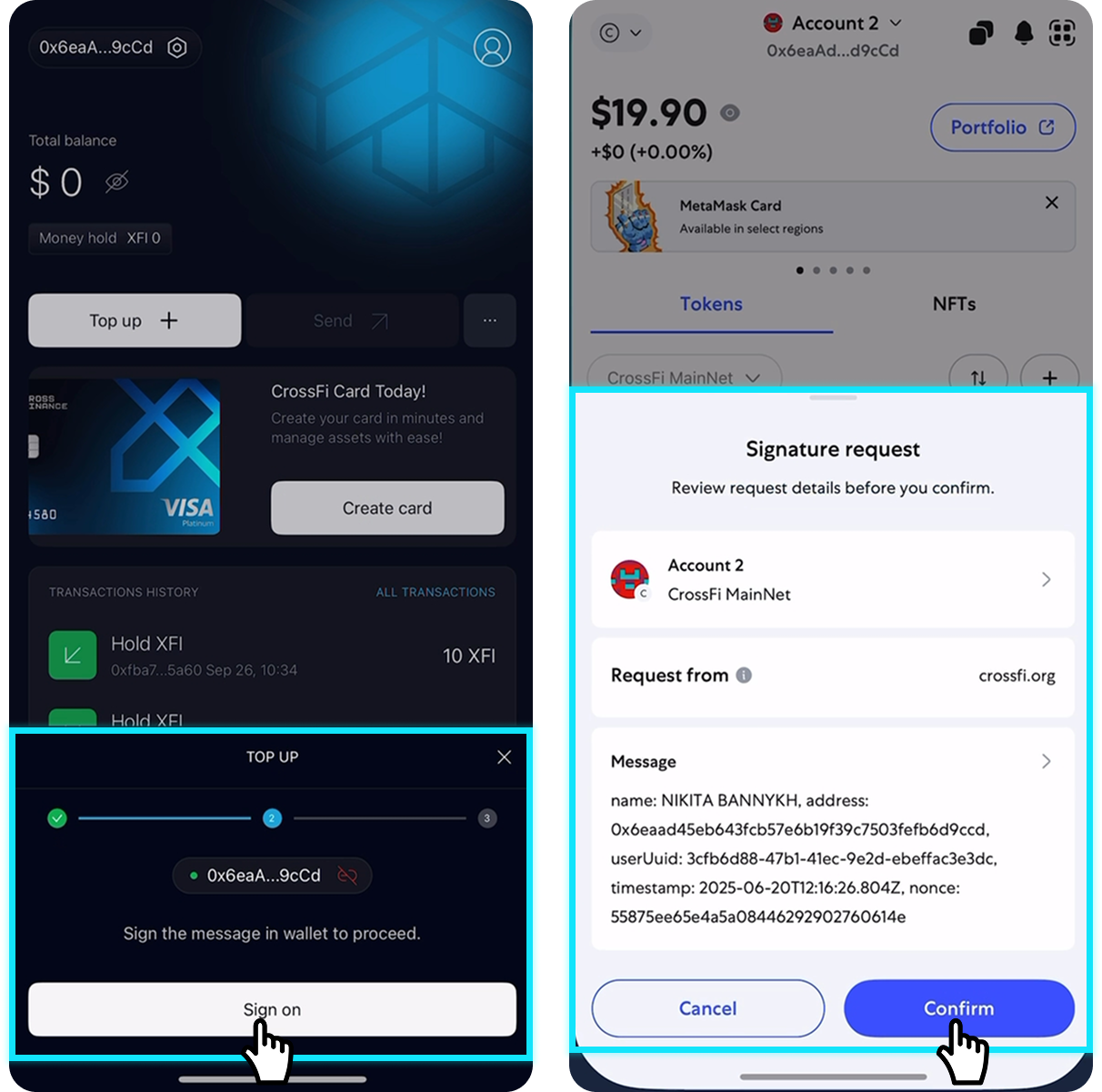
Step 2: Authorize Message Signing
This one-time security step allows CrossFi App to securely interact with your wallet.
- Tap "Sign on" in the CrossFi App
- Your wallet will open automatically
- Review the authorization message
- Click "Confirm" to sign the message
- Return to CrossFi App to continue
This message signing doesn't give access to your funds - it only authorizes the app to initiate transactions that you must approve.
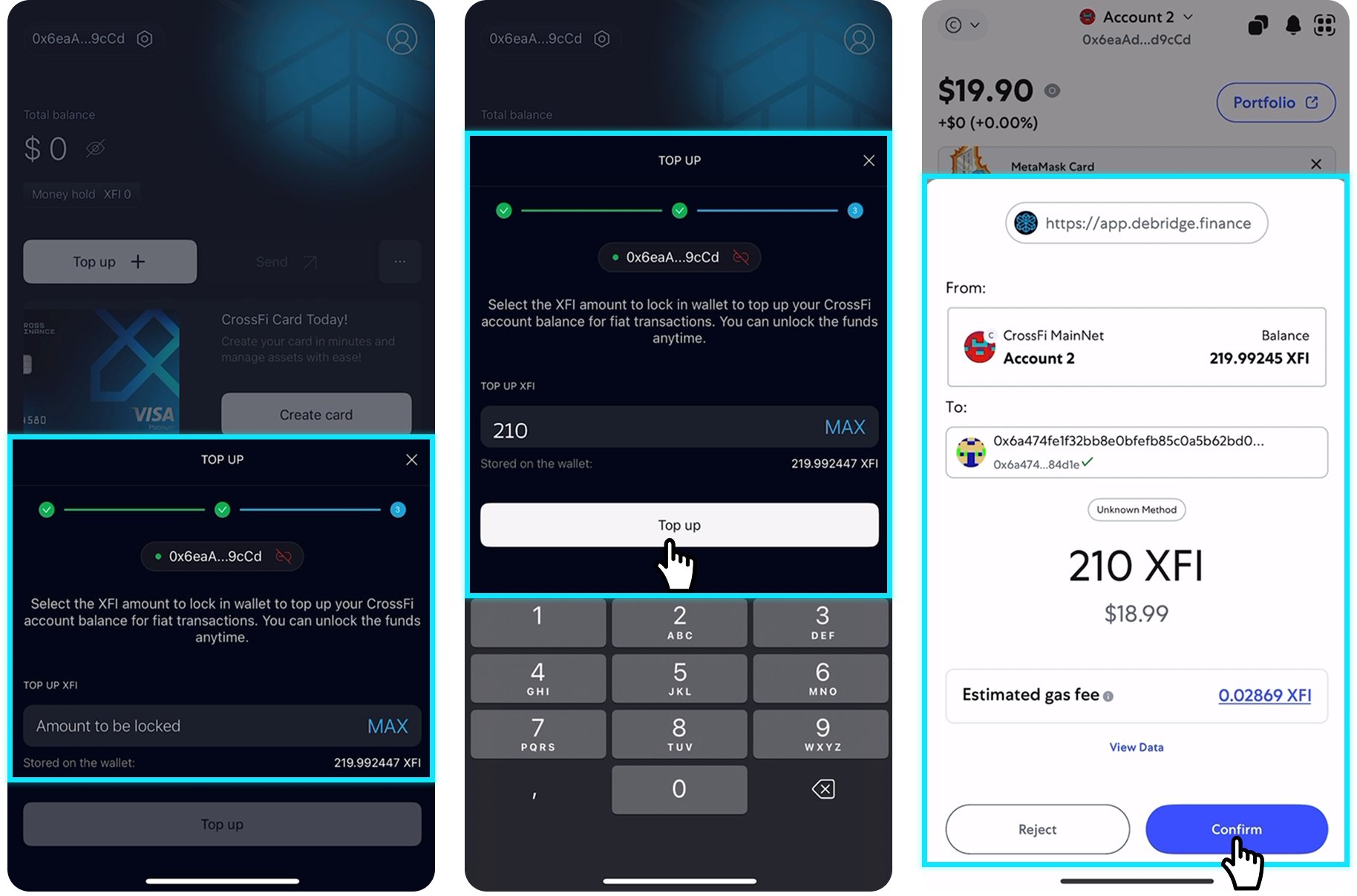
Step 3: Enter Top-Up Amount
- Enter the amount of XFI tokens you want to hold (fund Card Balance / Held Balance)
- Review the Hold Fee shown on the allocating screen
- Tap "Add money now" (the same action can be labeled "Top Up" in older versions)
- Your wallet will open for transaction confirmation
- Review transaction details including gas fees
- Click "Confirm" if everything is correct
Ensure you have additional XFI tokens in your wallet beyond the top-up amount to cover network gas fees. The transaction will fail if you don't have sufficient XFI for gas fees.
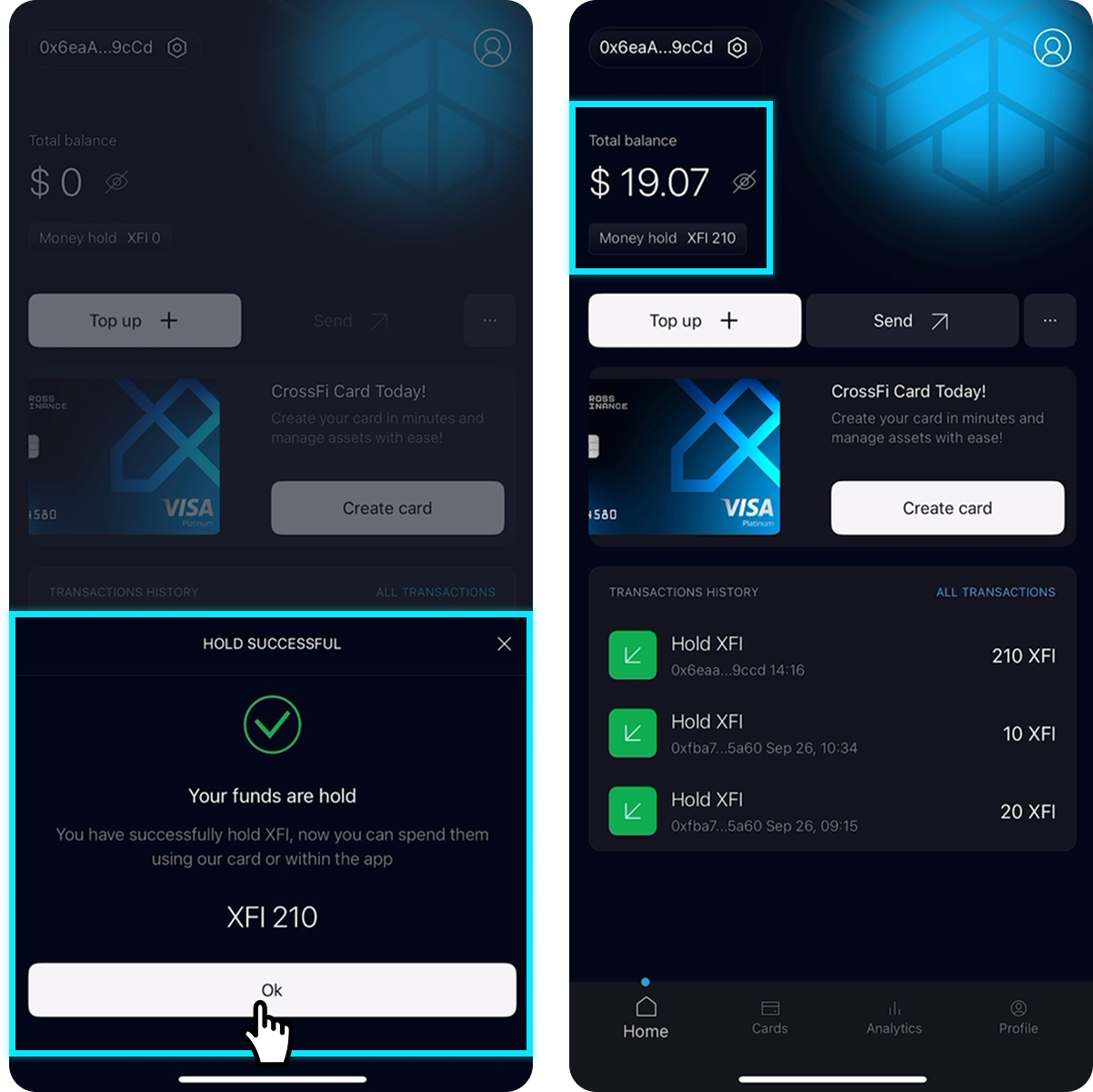
Step 4: Balance Update
- Wait while the app processes your transfer — it can take a few minutes
- Don't close the app until the process completes
- Your CrossFi App balance will update automatically
Your funds are now available for CrossFi Card transactions!
Related Features
💱 Token Swap
Exchange tokens from other networks for XFI directly within the app before topping up.
Learn about Swap👛 Wallet & Card Balance
Learn how the in-app Wallet works, what Wallet Balance and Card Balance (Held Balance) mean, and how Add Money / Hold funds your card.
In-App Web3 WalletNeed Help?
- ❓ Top-Up FAQ
- 🔧 Network Configuration
- 📞 Support
MetaMask, OKX Wallet, SafePal, TokenPocket, Gems, and other Web3 wallets.
Only one wallet can be used for holding funds at a time. To use a different wallet, you must first unhold all funds from the current wallet.
At least 200 XFI is required to issue a virtual card. These funds can then be used for purchases.
For complete FAQ including account management, cards, KYC verification and more: CrossFi App Complete FAQ
Having trouble with wallet network configuration?
Follow our detailed setup guide: Configure CrossFi Network
Still need assistance? Our support team is here to help:
- Complete FAQ: CrossFi App FAQ
- Telegram Community: https://t.me/crossfiofficial
- Discord Server: https://discord.gg/crossfi
- Email support: support@crossfi.org
Getting XFI tokens: How to Get Coins
Ready to get started? Download CrossFi App and begin your seamless Web3 payment experience today.